


Carnival HUB
4.672.40K Reviews
App Specs
- Version
- 4.4.0
- Updated On
- License
- Free
- Downloads
- 5,000,000+
- Developer
- Carnival Corporation
- Categories
- Travel & Local
- Platform
- Android, iOS
Screenshots
 Analysis by AppCompare
On a Carnival cruise, the day can fill up quickly: a show to catch, a meal to plan, people to find, and spending to keep an eye on. I see Carnival HUB as a useful shipboard organizer rather than a replacement for every other travel tool. Its real value is bringing practical cruise details together, so you can spend less time working out what is happening and more time enjoying the trip. It is a free Travel & Local app from Carnival Corporation, and its 4.6 average from around 178,000 ratings suggests plenty of travelers find a place for it in their cruise routine.
A ship-focused tool, not a general travel planner
The distinction matters before you install it. A maps app or a general travel planner helps with getting to the port, arranging a hotel, or finding things to do in a city. Carnival HUB is aimed at what happens once you are on a Carnival sailing: onboard activities, dining, entertainment, expenses, photos, and communication with other guests. I would use it alongside my normal travel apps, not instead of them.
That narrow focus is also a strength. The app has passed 5 million installs, but its usefulness depends on your trip: if you are sailing with Carnival, it can help coordinate the days onboard; if your holiday is a road trip, hotel stay, or cruise with another operator, it is not the right organizer. The Everyone age rating makes it suitable for a broad audience, although younger travelers will still rely on an adult for booking decisions and managing spending.
Getting ready without overplanning
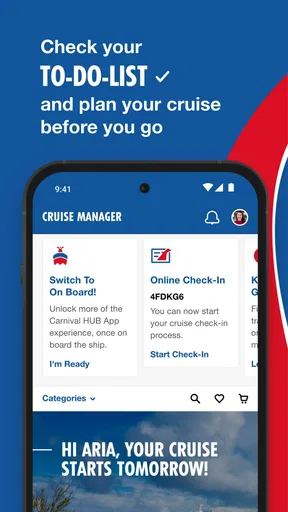
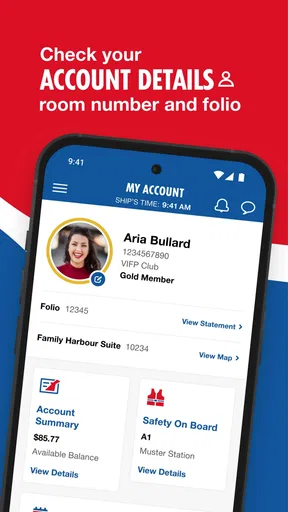
The first useful step is to install the app and enter your booking details before you are trying to organize a busy day. I would check that I can get into the account while I have a calm moment, then look at the itinerary and pick only the activities that genuinely matter to me. That avoids turning a holiday into a timetable of back-to-back commitments.
There is a practical trade-off in keeping plans inside a cruise app: the schedule is relevant to the ship, but your larger travel arrangements still belong elsewhere. I would keep travel-to-port details, hotel confirmation, and any plans for time ashore in my usual notes or travel planner. Then HUB can do the job it is better suited for—helping me make decisions about the onboard day without becoming a catch-all folder.
Setting Sail with Carnival HUB
First things first, getting started with Carnival HUB is a breeze. The app is available on both Android and iOS, so no matter which side of the smartphone fence you’re on, you’re covered. Once you’ve downloaded it, logging in is as simple as entering your booking details. The app immediately opens up a world of possibilities, making sure you know exactly what's happening on the ship at any given moment.
Your Personal Cruise Companion
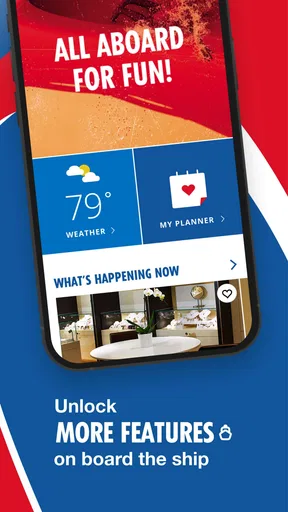
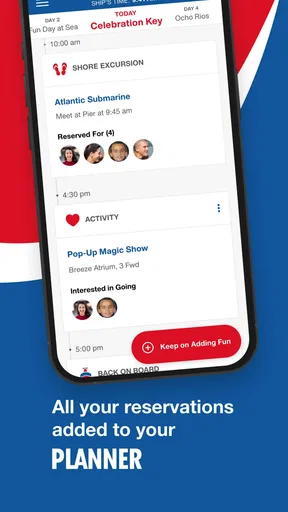
Imagine having an easy-to-navigate itinerary that updates in real-time. That’s exactly what Carnival HUB offers. You can see all the daily activities, check out dining options, and even book excursions directly through the app. It’s like having a personal cruise director who never sleeps. If you're someone who loves to plan every single minute of your vacation, this app is your dream come true.
Worth Reading Before You Choose

EA SPORTS FC Mobile 26 Is a Bigger Football Game, but It Takes Time

Flipboard Shows What News Apps Must Do Beyond the Feed

Switching to Android Auto Means Rethinking Your Driving Routine

Google Calendar Makes a Crowded Week Easier to Manage

Ludo King Makes the Most of the Minutes Between Plans

Baby Panda World Brings Quick Play to Modern Phones, but Its Game Library Feels Busy
For a more relaxed approach, I would treat the itinerary as a menu rather than a promise to attend everything. At breakfast, I might scan the day, choose one event I do not want to miss, and leave the rest open. That small habit makes the schedule helpful without letting notifications or a packed plan dictate the holiday. It is also a good way for a group to agree on a meeting point or shared activity before everyone wanders off to do their own thing.
Stay Connected, Even at Sea
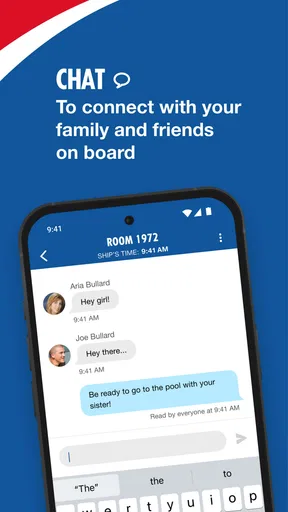
One of the coolest features is the in-app chat. For a small fee, you can stay in touch with friends and family on the cruise without needing an internet package. This feature is perfect for big groups or families who want to keep tabs on each other. Plus, it’s super easy to use—just add your friends and start chatting away.
I would agree on a simple routine before splitting up: use chat to settle where and when to meet, rather than expecting everyone to reply instantly throughout the day. That is especially useful when a family has different ideas about pool time, shows, or shore plans. The fee is a real consideration, though. If your group already expects to buy an internet package or only needs one fixed meetup time, the extra chat option may not be worth paying for; decide as a group instead of assuming every person needs it.
Dining and Entertainment at Your Fingertips
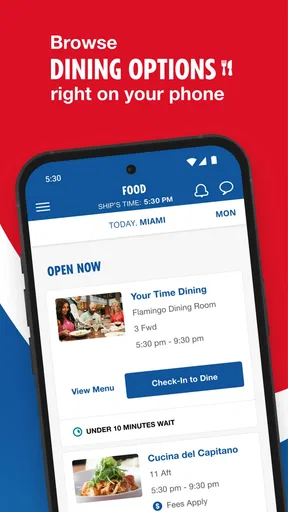
Let’s talk about food. Carnival HUB makes it super simple to check out all the dining options onboard. You can even reserve a table at the specialty restaurants directly through the app. As someone who loves to try different cuisines, I found this feature incredibly useful. No more wandering around trying to find out where you can grab a bite!
The most useful workflow is to check dining plans before the moment you are hungry. If a specialty restaurant is part of the evening, I would look at the options and reservation details earlier, then keep a flexible backup in mind rather than assume a preferred time will suit everyone. For a casual meal, browsing onboard choices can help a group settle on a direction before they start crossing the ship to find a table.
When it comes to entertainment, the app keeps you in the loop with all the shows and events happening on the ship. Whether you’re into comedy, live music, or theater, you’ll find it easy to schedule your evenings with just a few taps. It’s like having a personal entertainment guide right in your hand.
Here, I would leave a little breathing room between events. A schedule is great for spotting a show that fits your evening, but a cruise is not much fun if every transition becomes a race. Checking the lineup earlier can help a couple or family choose one shared event and still leave space for an unplanned drink, a quiet break, or a change of mind. If you would rather discover entertainment by walking around and seeing what appeals, the app can inform you without becoming your evening’s rulebook.
All About the Little Extras
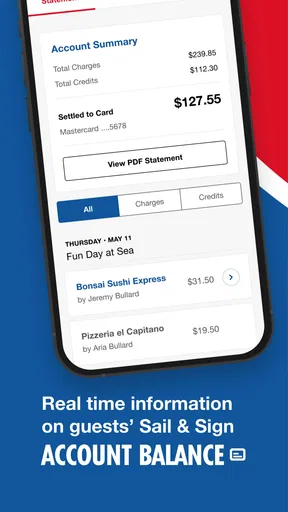
One of the things that stood out to me was the ability to track your onboard expenses. The app gives you a real-time view of your spending, so you can keep tabs on those souvenir purchases or cocktail splurges. This transparency is a game-changer for anyone worried about overspending while on vacation.
I would use that view as a check-in, not as a reason to audit every small purchase. For example, a quick look before dinner can tell you whether the day’s extras are adding up faster than expected, leaving time to adjust tomorrow’s choices. It is also useful for a family trying to understand shared spending, provided everyone agrees on who is checking and what purchases count as part of the same budget. That makes the feature more practical than waiting until the end of a trip to think about the total.
And if you’re someone who loves a good photo op, Carnival HUB lets you view and buy photos taken by the ship’s photographers. No need to wait in line at the photo gallery—you can do it all from your phone, which is pretty convenient if you ask me.
That option is most valuable if you already like the ship’s posed or event photos; it is less compelling if you only want the pictures you take yourself. I would browse when I have a quiet moment instead of feeling pressure to make a quick purchase while passing the gallery. The convenience is real, but it should not turn a casual look at vacation photos into an unplanned expense.
Where the convenience has limits
Because HUB is tied to a particular cruise experience, it cannot serve as a neutral trip planner for a mixed itinerary. I would still use a calendar or notes app for travel days and shore arrangements, and a maps app when navigating a port. Those familiar alternatives are better for information that has to work across different companies and destinations; HUB is the more relevant place for ship-specific plans and onboard spending.
There is also a small but important planning distinction between seeing an option and having a confirmed plan. When something matters—such as a meal with a group or a show you have all agreed to attend—I would check the relevant details in the app and make sure everyone knows the arrangement. A phone screen is convenient, but it does not solve indecision, missed messages, or a group that has not agreed on a time.
For travelers who dislike using a phone on holiday, the app may feel like one more thing to manage. You can choose not to organize every hour through it, but then its itinerary and quick-reference strengths matter less. I think the best balance is to use it for the few jobs that save real effort—checking what is on, coordinating a meetup, and keeping an eye on expenses—while letting the rest of the day unfold naturally.
Who will get the most from it
I would recommend Carnival HUB most strongly to first-time Carnival guests, families, and groups who expect to make different plans during the day. First-timers can use the activity and dining information to get oriented, while experienced cruisers may appreciate having common tasks in one place without needing to rely on memory. The app is currently at version 4.1.0 and requires Android 11 or later, so anyone using an older Android phone should check compatibility before depending on it for the trip.
It is less essential for a traveler who prefers paper plans, has little interest in onboard events, or is not sailing with Carnival. In those cases, a personal calendar, a notes app, or the cruise operator’s own information channels may fit better. I would also avoid making the app the only place a group records an important meeting plan: sharing the time directly gives everyone a clear reference if they are not checking their phones.
Wrapping It All Up
Overall, I have to say, Carnival HUB is a fantastic tool for anyone looking to make the most out of their cruise experience. It covers all the bases—planning, dining, entertainment, and more. The app is user-friendly, and the features are genuinely useful, making it easier than ever to enjoy your vacation to the fullest.
If you’re setting sail with Carnival Cruise Line anytime soon, do yourself a favor and download the app before you board. It’s like having a secret weapon for an unforgettable cruise experience. Bon voyage!
Pros
- Easy navigation and user-friendly interface.
- Real-time updates on ship activities.
- Personalized itinerary planning.
- Integrated chat feature for group coordination.
- Access to restaurant and service bookings.
Cons
- Limited functionality without onboard Wi-Fi.
- Occasional glitches with notifications.
- Chat feature lacks multimedia support.
- Some features require additional fees.
- Interface can be slow during peak times.
FAQs for Carnival HUB
What is Carnival HUB and what does it offer?
Carnival HUB is an app designed for cruise ship passengers to enhance their onboard experience. It provides access to daily schedules, allows you to check out dining options, book shore excursions, and even chat with other cruisers. The app is user-friendly and helps you make the most of your cruise adventure.
Does Carnival HUB require an internet connection to function?
Carnival HUB primarily works offline when you're on the ship, which is convenient as it doesn't require a constant internet connection. However, some features like chat and viewing purchased photos need a Wi-Fi connection. Carnival offers an onboard Wi-Fi plan for those who wish to stay connected.
How does the chat feature work on Carnival HUB?
The chat feature allows you to communicate with friends and family onboard. It requires a small fee to activate, but once enabled, you can send messages to other users who have also activated the chat. This feature is particularly useful for coordinating meetups and sharing plans during the cruise.
Can I manage my bookings through Carnival HUB?
Yes, Carnival HUB allows you to manage various reservations such as dining, spa appointments, and shore excursions. You can view and modify bookings directly through the app, ensuring you have all details at your fingertips, making it easier to plan and adjust your activities as needed.
Is Carnival HUB available for both Android and iOS devices?
Carnival HUB is available for download on both Android and iOS platforms. You can find it on the Google Play Store and Apple App Store. The app is free to download, and once installed, it provides a seamless way to manage your cruise experience from the palm of your hand.


